
Edit Multiple photos at once.

Jumpman is a free, open-source batch photo editor. Select a set, make one edit, and every shot follows, with per-photo control whenever you want it.

  • Free & open source
  • Works offline
  • No account
  • Your photos never leave your device
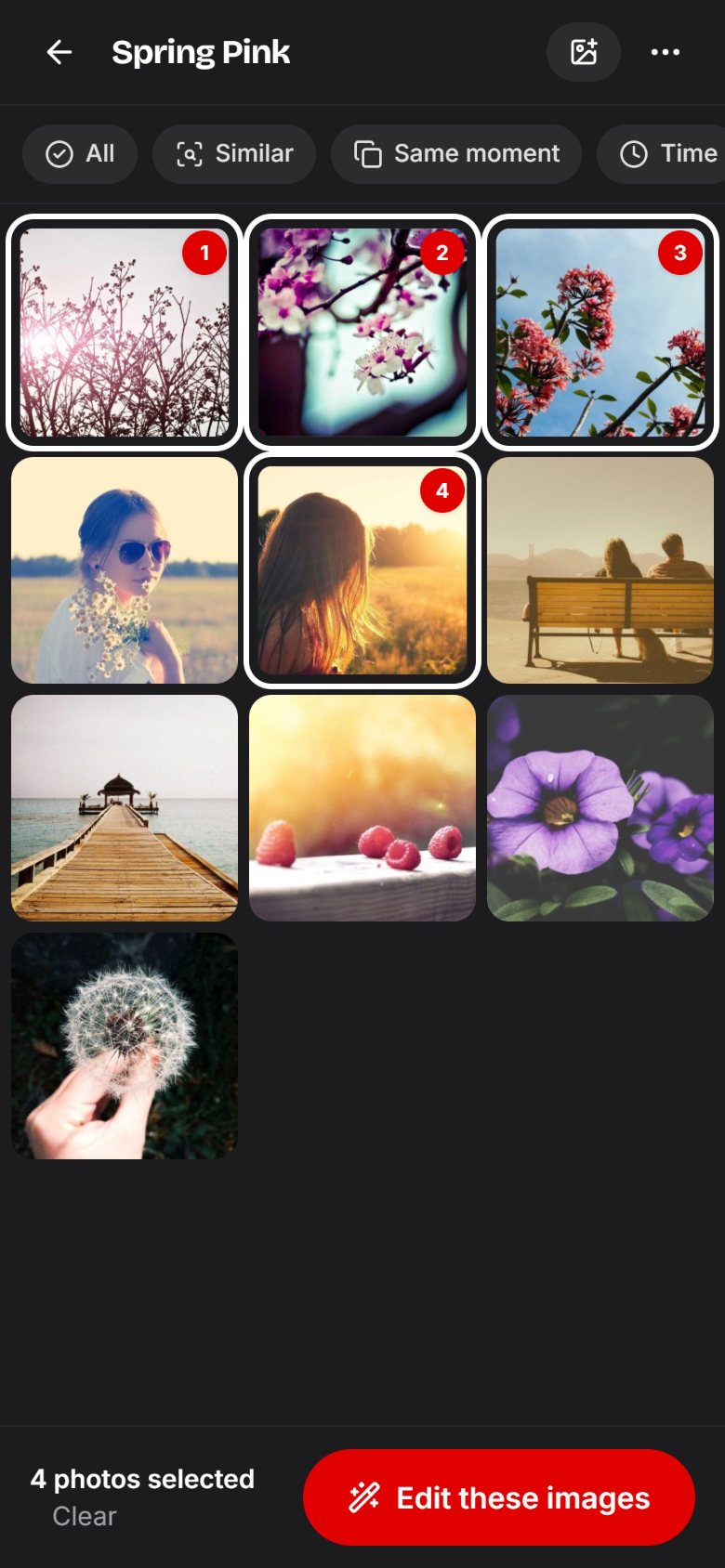
The Spring Pink collection in Jumpman with four of ten photos selected and an “Edit these images” button.
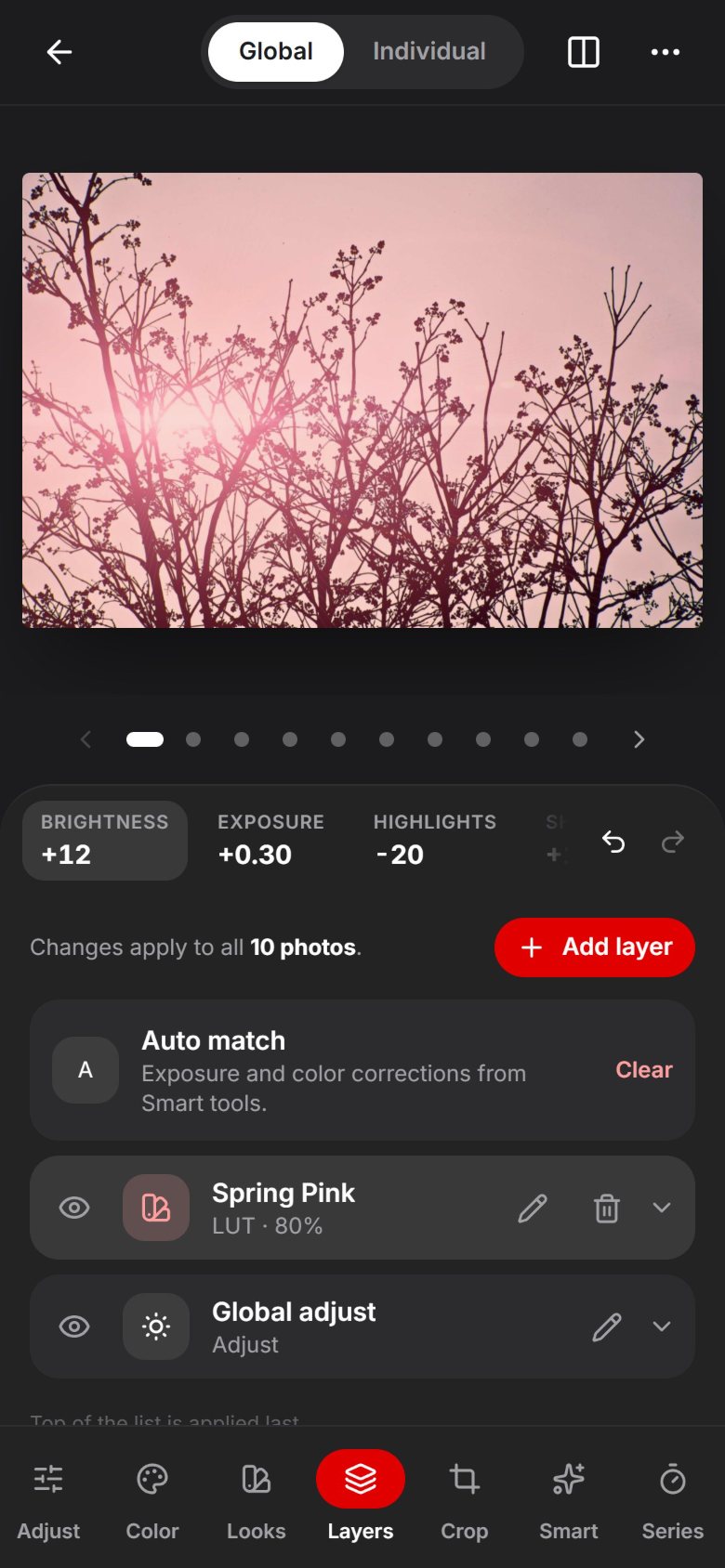
The layer stack in Jumpman: auto match, a Spring Pink LUT at 80% and the global adjust layer.
Jumpman’s editor in Global mode: the summary bar shows Brightness +12, Exposure +0.30 and Highlights −20 above the red Brightness row and the dial.

Three steps. Any number of photos.

Bulk photo editing without the busywork: no exporting one shot at a time, no copying settings by hand. Jumpman treats a batch like a single image, until you want it not to.

  1. Collect

    Drop photos into a collection like “Spring Pink”. They stay on your device. Nothing is uploaded, ever.

  2. Select

    Tap the shots you want, or let smart selection grab every photo from the same moment, scene or palette.

  3. Edit together

    Every slider, layer and preset lands on the whole selection. Flip to Individual to fine-tune one photo without breaking the set.

Batch editing

The core of Jumpman: a batch that behaves like a single photo, until you want it not to.
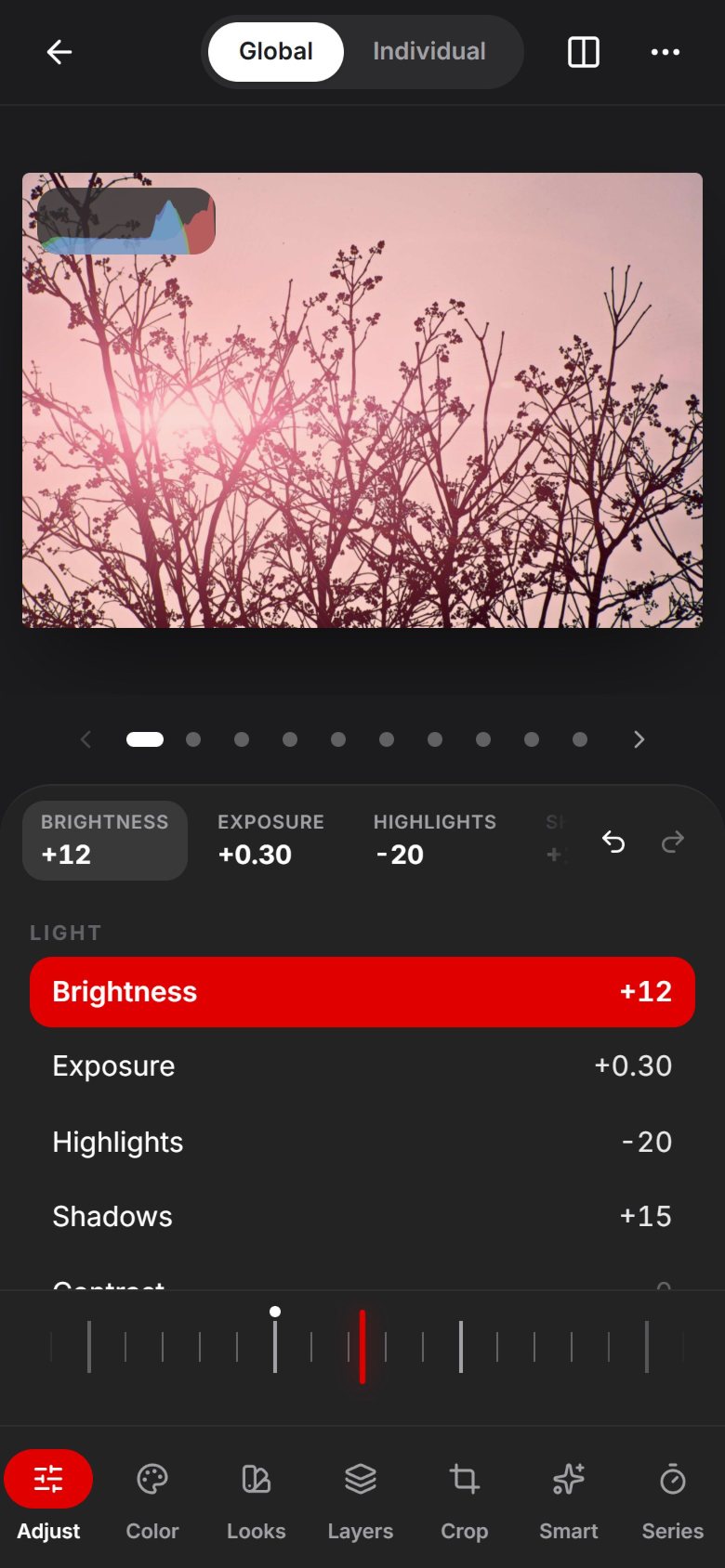
Jumpman’s editor in Global mode: the summary bar shows Brightness +12, Exposure +0.30 and Highlights −20 above the red Brightness row and the dial.
One global edit, applied to all ten photos.
  • Collections

    Available

    Photos live in collections like “Spring Pink”. Multi-select the shots you want, tap “Edit these images”, and they open as one batch.

  • Global edit with a summary bar

    Available

    Set brightness, exposure, highlights, shadows and saturation once for the whole batch. A summary bar keeps every change in view.

  • Global or Individual

    Available

    One toggle switches between editing the batch and fine-tuning a single photo. A dot indicator flips you through the set, photo by photo.

  • Layers

    Available

    Stack Adjust, LUT, Curves, HSL and Split toning layers. Add, edit, delete and reorder them, and give each its own opacity.

  • A panel made for precision

    Available

    A dial-style slider for fine moves, a live histogram, and a before/after compare that is always one tap away.
Pro workflow

The tools a working photographer reaches for, rebuilt for sets of photos instead of single frames.

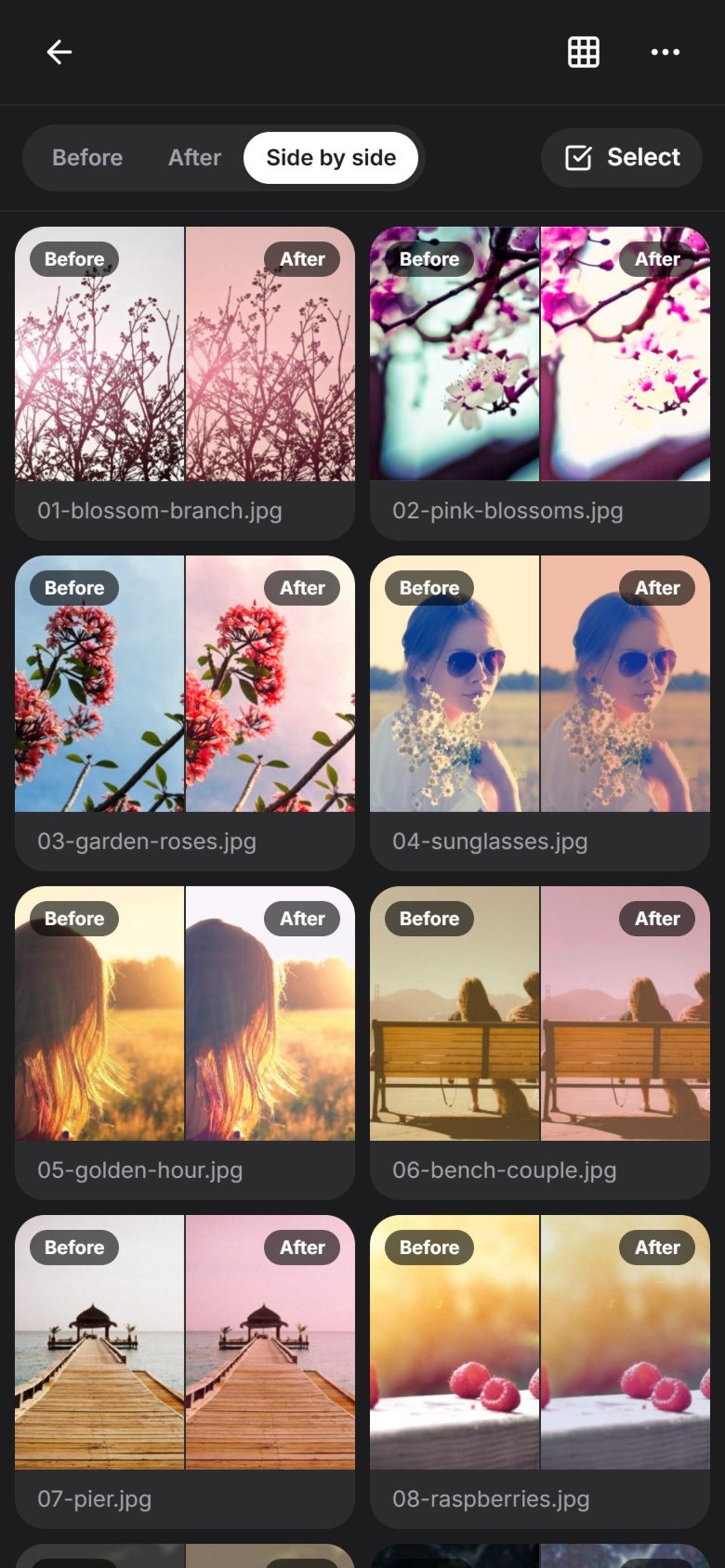
A side-by-side before-and-after grid of the whole batch in the Spring Pink look.
Check the whole batch before and after.
  • Presets and recipes

    Available

    Save any edit as a preset, then share it as a link or a file.

  • Copy and paste edits

    Available

    Copy an edit from one photo and paste it onto any selection.

  • Auto-match exposure and white balance

    Available

    Even out a set shot under mixed lighting, so the window-lit and lamp-lit frames finally agree.

  • Smart selection

    Available

    Select by similarity, by time range or moment, by scene type, or by color palette.

  • Per-photo override indicator

    Available

    See at a glance which photos differ from the batch, and reset any of them with one tap.

  • Batch before/after grid

    Available

    Review the whole set before and after, side by side.

  • Masking and local adjustments

    Available

    Linear, radial, luminance and color-range masks, plus heuristic sky and subject masks that adapt to each photo in the batch.

  • Bulk crop and aspect ratios

    Available

    Crop everything to 1:1, 4:5, 3:4, 9:16 and more, then reposition the framing image by image.

  • Batch export

    Available

    Resize and export to JPEG, PNG, WebP or AVIF with quality control, watermarks and filename patterns, as a ZIP or straight to the share sheet.

  • Non-destructive history

    Available

    Per-batch undo and redo, and a one-step revert of the whole collection to the originals.

  • Advanced color

    Available

    Curves, 8-band HSL, split toning and 15 built-in LUTs with live previews. Import and export .cube files.

    • Spring Pink
    • Teal & Orange
    • Warm Film
    • Green Film
    • Vivid Slide
    • Matte
    • Golden Hour
    • Nordic
    • Pastel
    • Cross Process
    • Bleach Bypass
    • Neon Night
    • Mono
    • Noir
    • Sepia
  • RAW files and Lightroom XMP

    Available

    Opens RAW files through their embedded full-size previews (DNG, CR2/CR3, NEF, ARW, RAF, ORF, RW2 and more). Imports and exports XMP compatible with Lightroom, and imports Capture One styles.

Only in Jumpman.

Ideas you won’t find in other editors, built for the moment you have forty photos and one evening.

Describe the edit

warmer, softer highlights, slightly faded

  1. warmerTemperature +20
  2. softer highlightsHighlights −25
  3. slightly fadedContrast −2Saturation −2Fade +8
Edit by description. Real output from Jumpman’s offline parser, computed when this page was built.
Reference-match. Pick a hero shot. Five photos with five different color casts come back as one set.
  • Reference-match

    Available

    Pick a hero photo and the rest of the batch matches its tone and color.

  • Edit from a sample image

    Available

    Drop in any photo you love and get a LUT that approximates its look.

  • Consistency score

    Available

    See how cohesive the set really is, then press Harmonize to pull the outliers into line.

  • Adaptive global edits

    Available

    Exposure +0.6 means “bring everything to this brightness”, not “add 0.6 to everything”, so dark and bright shots land in the same place.

  • Edit by description

    Available

    Type “warmer, softer highlights, slightly faded” and get real slider moves. It runs fully offline.

  • Scene-aware auto edit

    Available

    An auto edit that knows what it’s looking at: sky, skin, foliage and architecture each get the right treatment.

  • Series mode

    Available

    Deflicker a time-lapse, or shift color gradually from the first photo to the last.

  • Community preset gallery

    Available

    Preview community presets on your own batch before you save one, then fork and remix it.

  • Version branches

    Available

    Keep a “warm” and a “moody” take of the same batch and compare them side by side.

  • Edit replay

    Available

    Record a session as steps and replay it on a new batch, like a macro.

  • Collaborative review

    Available

    Send a client a small review file. They comment, approve and suggest edits that show up as proposed layers. No server needed.

  • Platform-aware export

    Available

    Preview your Instagram grid and carousels, auto-crop to fit, and drag photos into order.

  • Offline-first PWA

    Available

    Install it once and edit on a plane. Everything is stored locally on your device.

  • Everything above ships in the free web app. No account, no upload, no catch.

    Try them all

On the roadmap.

Where Jumpman is headed next. Want one of these sooner? Help build it on GitHub.

Help build it
  • Roadmap

    End-to-end encrypted sync

    Keep collections in sync across your devices, encrypted before they leave each one.

  • Roadmap

    Real-time collaboration

    Edit the same batch together, live.

  • Roadmap

    AI segmentation masks

    Sharper subject and object masks from models that run on your device.

  • Roadmap

    Brush masks

    Paint an adjustment exactly where you want it.

  • Roadmap

    Full RAW decoding

    Decode sensor data directly with LibRaw compiled to WebAssembly.

  • Roadmap

    Publish presets from the app

    Upload a preset to the community gallery without leaving Jumpman.

Your photos never leave your device.

Read the source
  • On your device, by design

    Photos are decoded and edited with WebGL2 right in your browser. There is no upload step, because there is no server to upload to.

  • Works offline

    Jumpman is a progressive web app that keeps collections, presets and history in IndexedDB. Install it once and keep editing on a plane.

  • Open source, MIT licensed

    Read every line, fork it, or host it yourself. No account, no subscription, no lock-in.

Built with

  • TypeScript 7
  • React 19
  • Vite 8
  • WebGL2
  • Tailwind CSS 4
  • Astro 7
  • Capacitor 8 (Android)
  • PWA + IndexedDB

Install it anywhere.

Use it in the browser, add it to your home screen, or host it yourself. Same app, same offline engine, everywhere.

In your browser

  1. Open the web app in any modern browser, on desktop or mobile.
  2. Start editing right away. There is nothing to sign up for.
  3. To install it, choose Install app (or Add to Home screen) from your browser’s menu. It opens in its own window and works offline.

Runs in any modern browser with WebGL2, on desktop and mobile.

Open the web app

On Android

  1. Download the latest .apk from GitHub Releases.
  2. Open the file. If Android asks, allow your browser to install unknown apps.
  3. Tap Install, then open Jumpman from your app drawer.

A free .apk on GitHub Releases. No store account needed.

Download for Android

On iPhone and iPad

  1. Open the web app in Safari.
  2. Tap the Share button.
  3. Choose Add to Home Screen. Jumpman opens full screen and works offline.

Installs straight from Safari. No App Store needed.

Open the web app

On your own server

  1. Download jumpman-web-<version>.zip from GitHub Releases.
  2. Unzip it.
  3. Serve the folder with any static file server: nginx, Caddy, GitHub Pages, or python3 -m http.server for a quick test.

Serve it over HTTPS (or from localhost) so the app can install and work offline.

One folder of static files. No database, no backend.

Go to Releases

From source

  1. You need Node.js 22.12 or newer and pnpm.
  2. Clone the repository, install dependencies and start the dev server.
git clone https://github.com/fzn0x/jumpman.gitcd jumpmanpnpm installpnpm dev
View on GitHub

Stop editing one photo at a time.

Open Jumpman in your browser and finish your next set tonight. Free, open source, and yours to keep, even offline.